Changelog

Follow new updates and improvements to Oneteam.

Release 2026.45

Week 45 of 2026

Respondents on anonymous forms and surveys can now choose to share their name, and admins can post company updates in their own name. Tasks get more control too: a start date, per-task notifications and a filter for who created them. We also fixed a long list of issues across web, iOS and Android.

✨ General

πŸ™‹ Let respondents choose to share their name
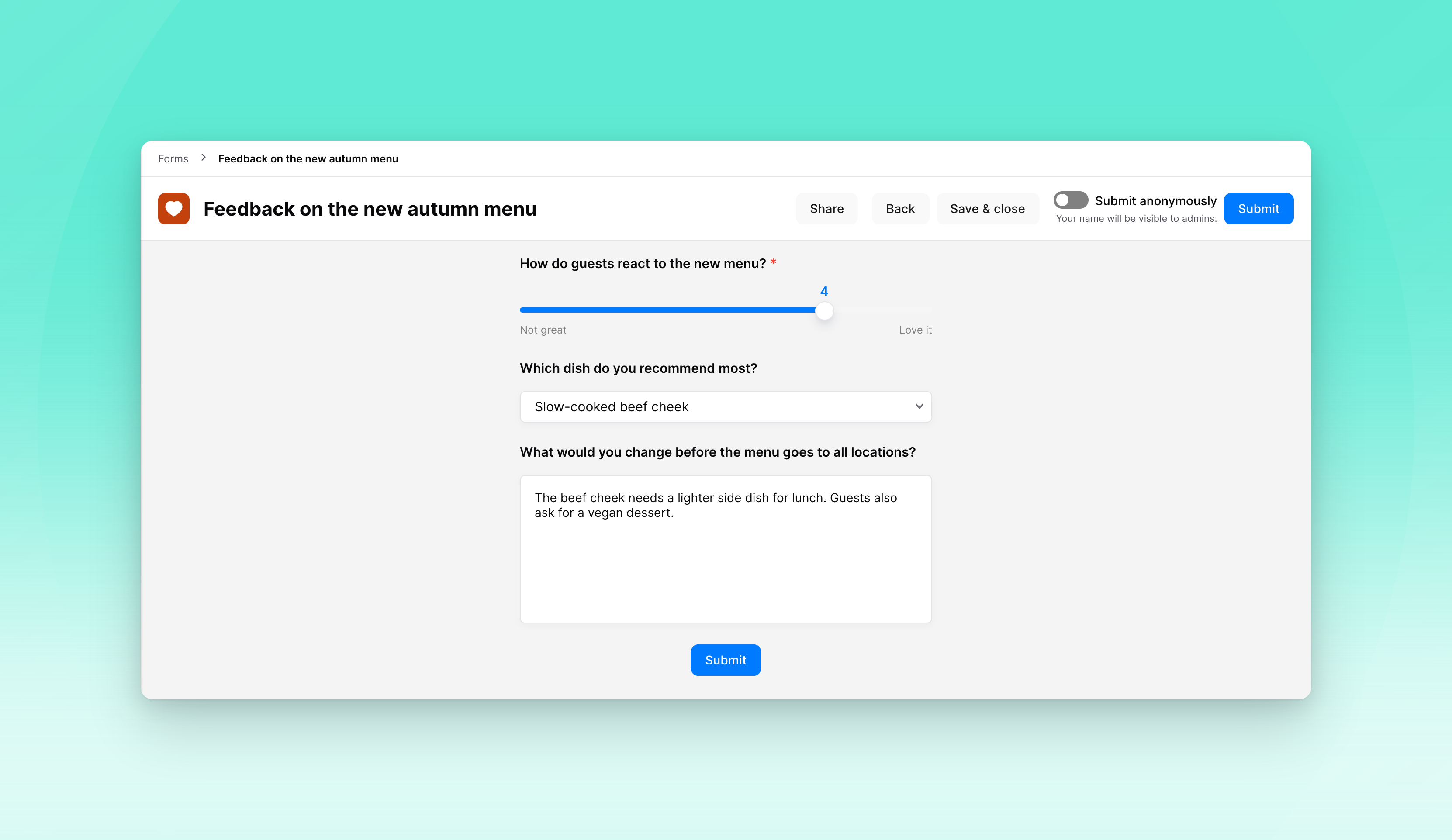
On an anonymous form, admins can now let respondents decide for themselves. A toggle above the Submit button starts on anonymous, and anyone who turns it off submits with their name. Admins then see that name on the submission, while anonymous answers stay anonymous, even if the setting changes later.

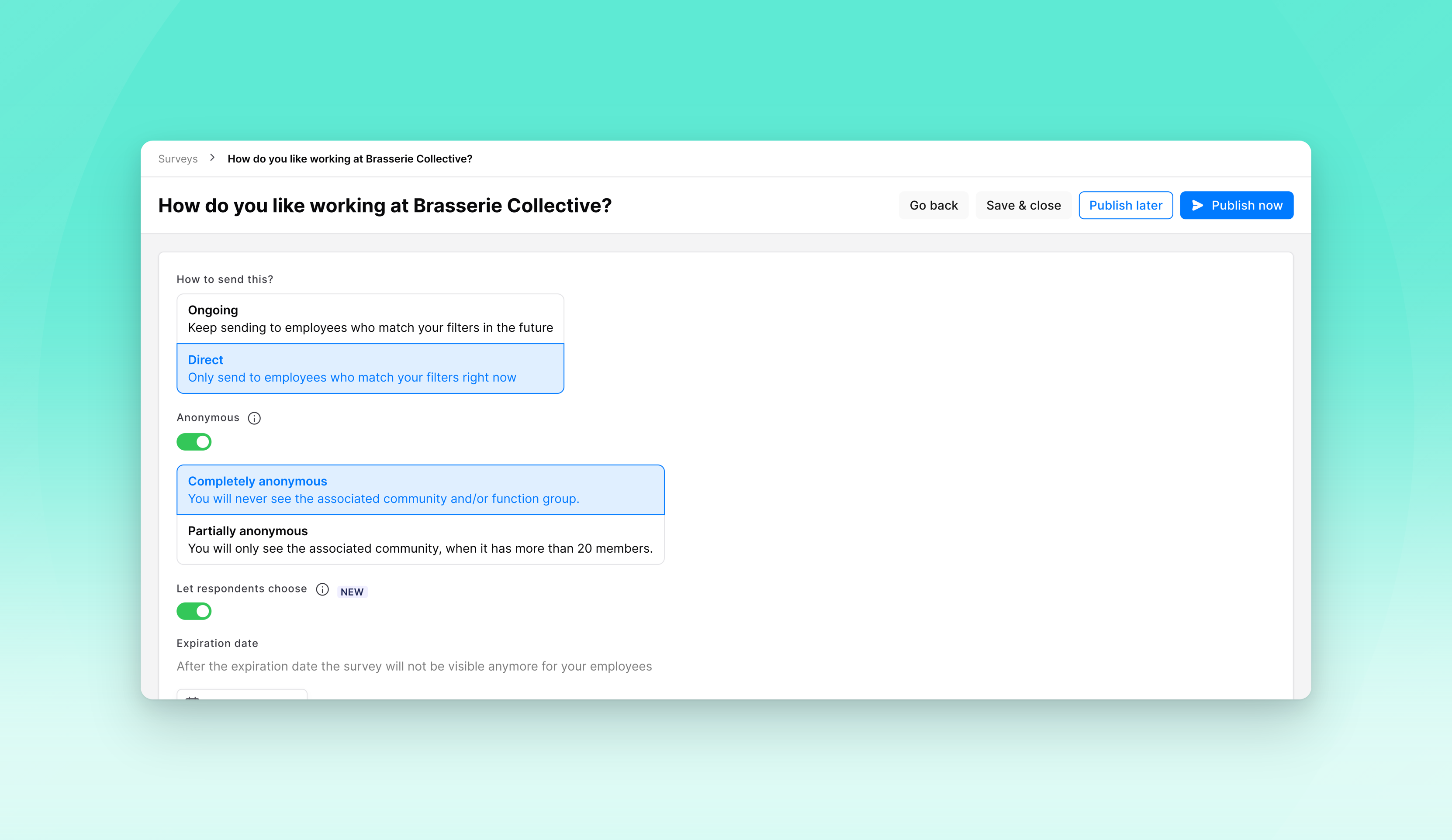
πŸ—³οΈ Respondents choose on surveys too

Anonymous surveys work the same way now. Admins can let respondents decide, and on the last step a toggle above Submit starts on anonymous. Someone who wants to be heard by name, for example in an exit survey, turns it off. Who has and hasn't responded stays hidden either way.

✍️ Post company updates in your own name
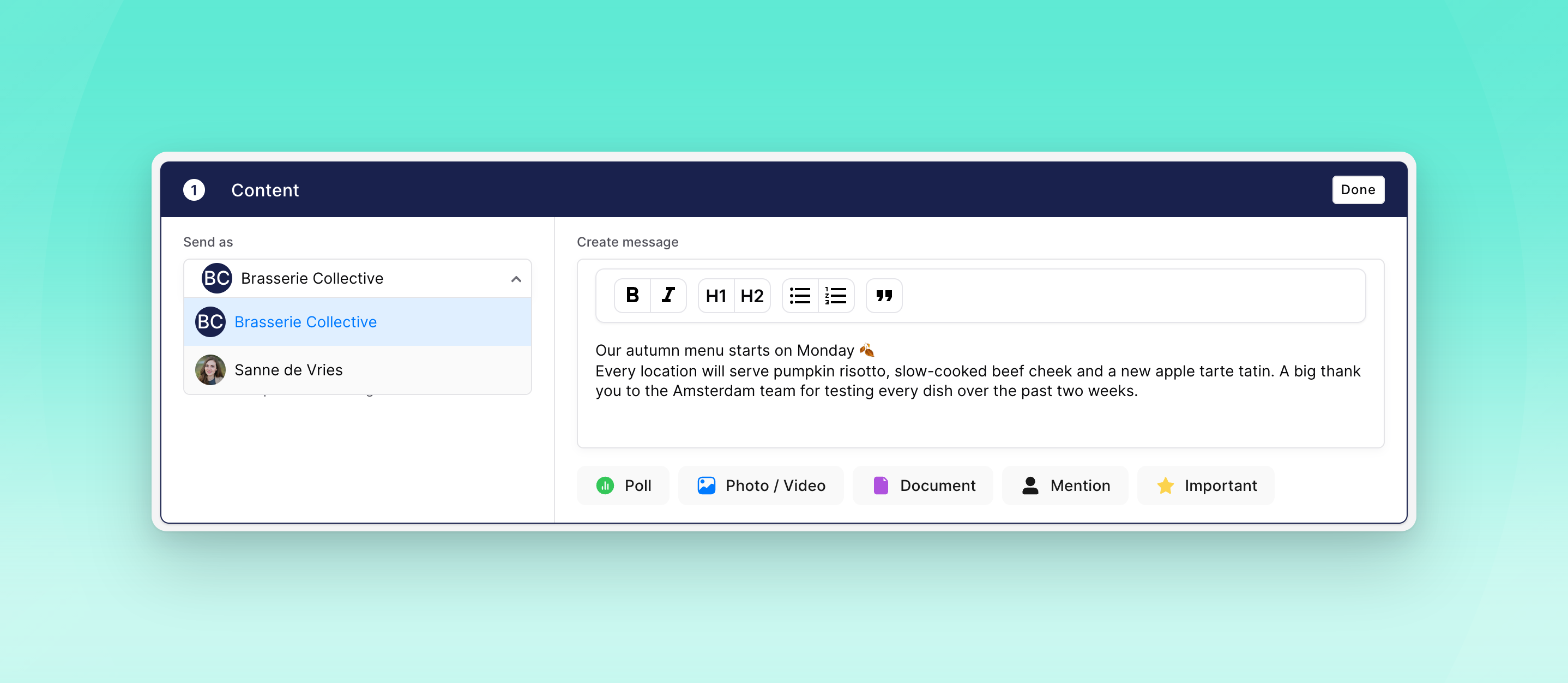
Admins who can post company updates can now choose to post as themselves, with their profile picture and name, instead of as the organisation. The post still appears in Company updates, and notifications show the name you chose. On web, creating the post now happens on one screen: content first, then who it's for.

πŸ“Š See how often and how long Oneteam is used
We now track when people open Oneteam and how long they stay. In Analytics, admins can use two new figures, App sessions and Time on Oneteam, and split them by platform, community, function group or team. Time is always shown as a group total, never per person.

πŸ’¬ Start a chat from the colleague list
Starting a new private chat now uses the same colleague list as creating a group chat. Search by name or filter by community, function group, manager or custom employee field, and tap someone to open the chat straight away.

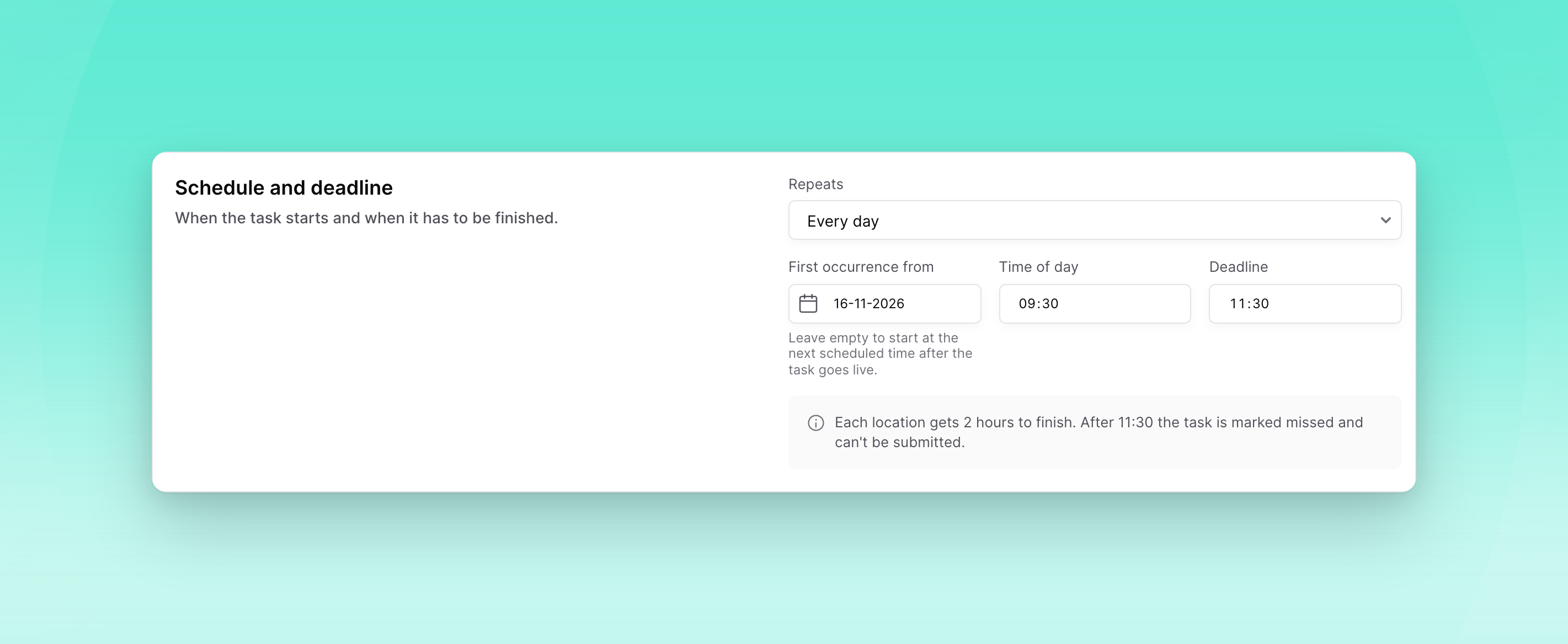
πŸ“… Choose when a recurring task starts

Admins can now set an optional start date on a recurring task, so the first instance can be planned for a later date. Leave it empty and the task starts at the next recurrence, as before.

πŸ”” Choose which notifications a task sends
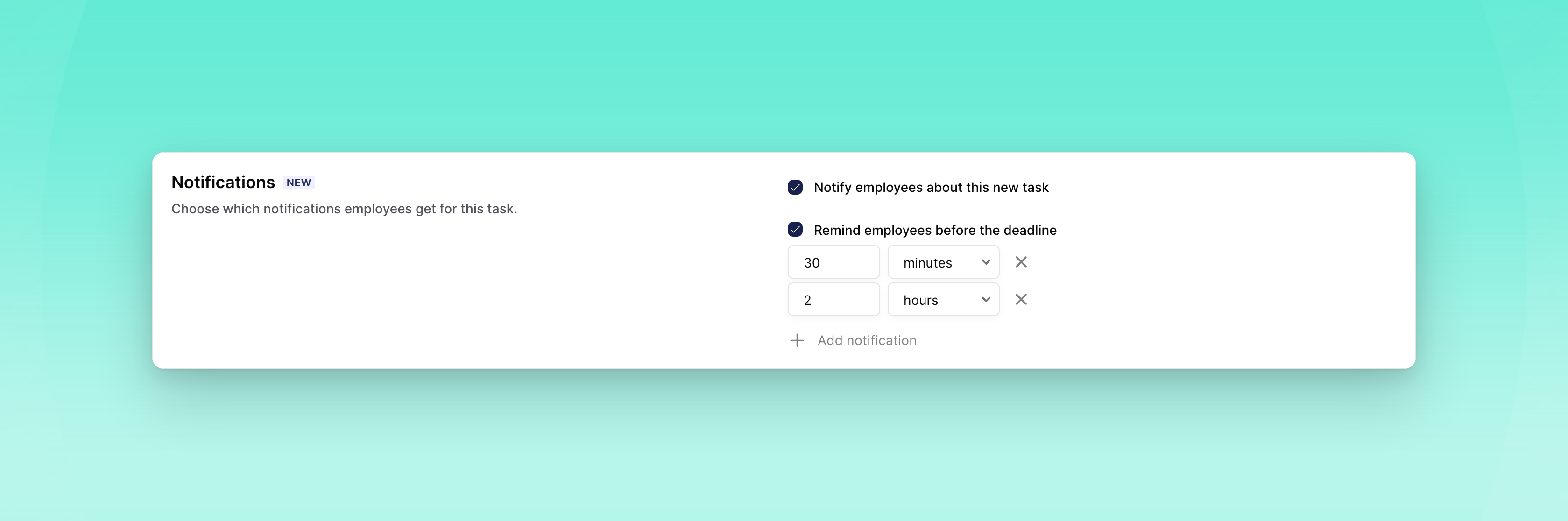
Per task, admins now decide whether employees get a notification when a new task is ready, and whether they're alerted before the deadline. The deadline alert starts at 30 minutes and you can add more moments. You can change both on drafts and on live tasks; the change applies to notifications that haven't gone out yet.

πŸ”— Byner access follows the employment end date
For organisations connected to Byner, employees now keep access to Oneteam until their employment end date. Closing an assignment during a notice period or an internal move no longer removes someone early.

πŸ€– Create tasks with your AI assistant
If you've connected Oneteam to an AI assistant, you can now ask it to create tasks: one-time or recurring, for people, teams or function groups. A task starts as a draft, and the assistant asks you to confirm who gets it and when before it goes live.

πŸ’» Web

πŸ”Ž Filter tasks by who created them
The organisation's Tasks & Checklists overview has a new Created by filter. Tasks that community admins made for their own community are hidden by default, so the overview shows the organisation's own tasks, and you can include them whenever you need to.

🎬 Watch how tasks work
When your dashboard is in Dutch, a video button next to Create task explains how tasks and checklists work.

πŸ“± Mobile

πŸ—“οΈ Subscribe to your Oneteam calendar
You can now add your Oneteam calendar to Google Calendar, Apple Calendar or Outlook with a personal link. Choose which items to include (shifts, events, celebrations and exchanges), and your calendar app keeps them up to date.

πŸ› Bug fixes

General

  • Deleting an Academy course no longer leaves it behind in learning paths.

  • Academy quiz answers are shuffled again in the app.

  • Academy courses created through an AI assistant connection now get the language of their content, and a course's language can be corrected without translating it.

  • Loket now also assigns function managers, not only employee managers.

  • An API key with only task permissions can now create tasks, for example from n8n.

  • Forms and tasks written in Dutch before multilingual content arrived are now set to Dutch as their main language.

  • The employee overview shows "Date in service" again when it's filled in.

  • Integration syncs no longer fail while assigning managers.

  • Personio now syncs phone numbers and birthdays when they're stored as custom attributes.

  • For organisations connected to Strobbo, synced shifts now belong to the right community, so employees can offer them for exchange and see the community name as the location.

Web

  • Shortcut links show their real destination again, and shortcuts to built-in features can be shared.

  • An evaluation form with competencies can no longer be set live without a rating scale.

  • PDF files open in the preview again.

  • Numbered lists in timeline posts keep their numbering again when an item contains a line break.

  • Adding open answers to a survey report works again.

  • You can edit the location of a copied event again.

  • The statistics overview updates again when you change the date.

  • Long "Grouped by" labels in bar charts are shortened with an ellipsis.

  • The audience label on an Academy course card stays inside the card when several function groups are targeted.

  • Reopening an organisation is fast again.

  • The new chat dialog no longer offers "Create group" when group chats are turned off.

  • Internal links show as labels again when you edit a timeline post.

  • Switching community from the top bar now asks before discarding your unsent timeline post.

  • The Poll button in the post editor is readable in dark mode again.

  • Images no longer show below the edit form while you edit a timeline post.

  • A link preview in the chat composer no longer turns up after the message with that link was already sent.

  • Filter lists no longer get cut off in the "Create a new group" dialog.

  • Privacy settings show the phone number option as readable text again, with proper spacing next to the icons.

  • Timeline cards line up their details and the counters on important messages properly again.

  • Deleted employees can no longer be opened from the Employees overview.

  • Long web addresses in timeline link previews stay inside the post.

iOS

  • The top bar of the Hub no longer gets stuck, and the header photo comes back after switching organisation.

  • Links and mentions in image captions in chat can be tapped again.

  • A chat opened from a notification no longer goes blank when the keyboard opens.

  • Everyone you tag in a group chat stays tagged after sending.

  • Sharing files to Oneteam is readable in dark mode again.

  • The unread count on the Notifications tab shows reliably again.

  • The voice message button comes back after you send a text.

  • Long event tags in the calendar are cut off neatly.

  • Your profile picture in the Hub is round again and the badge is fully visible.

  • Documents no longer show a white strip after turning back to portrait.

  • Event and course header images fit their image instead of being heavily cropped, and you can tap them to view them full size.

  • Academy videos show picture again instead of playing audio over a blank screen.

  • You can take a photo or record a video from the timeline composer again.

  • Switching between light and dark mode updates every screen straight away, and action menus are fully dark in dark mode.

  • The mention list is readable in dark mode again.

  • A form draft is removed once you submit it from the drafts list.

  • Form submission comments follow dark mode again.

  • Times read "1 hour ago" instead of "1 hours ago".

  • The chat list no longer occasionally freezes the app.

Android

  • Profile pages load faster, and the header no longer waits for every detail before it appears.

  • Celebrations are grouped under the right day again, and each person appears once.

  • Some videos recorded on an iPhone play with picture again instead of a black screen.

  • You can save timeline videos to your gallery again.

  • Links in italics open again.

  • Password reset links open the reset page again instead of showing an error.

  • A form submission shows when it was submitted, not when it was last updated.

iOS and Android

  • In dark mode, more screens use dark colours, and icons that disappeared on a dark background are visible again.
Release 2026.43

Week 43 of 2026

✨ General

🌐 Forms and tasks in more than one language
Admins can offer a form or a task in several languages without copying it for each one. You pick a primary language, add the others, and the text is translated for you. While editing you can switch language and translate again from the primary language. If the text does not match the language you are editing, you get a warning, and you can still save. Anyone who opens the form or task sees it in their own language. The language setting now includes forms and tasks, as well as posts and Academy.

πŸ” Password reset by email link
Forgot your password? You now get a confirmation link by email first. The password only changes after you open that link, and then you receive a temporary password. Knowing someone's email address is no longer enough to reset their account.

πŸ‘€ Department managers from Loket
Department managers set up in Loket now come through as managers in Oneteam.

πŸ’» Web

πŸ“‹ Changing the type and schedule when you duplicate a task
When you duplicate a task, you choose whether the copy is one-time or repeating, with the same dates and repeat options as when you create a task. The copy is saved as a draft. The original task stays as it is.

πŸ—‚οΈ More consistent lists and forms
Lists and forms on the web were rebuilt, including the timeline, notifications, submissions and the forms you fill in. They work more consistently from screen to screen.

πŸ“± Mobile

πŸ’¬ Reply to photos and files in chat
You can reply to an image, video, document or GIF in a chat, not only to text. The reply shows the kind of message, such as an image, instead of the file itself.

πŸ‘₯ Search a group chat's members
A group chat shows up to ten members, with a way to open the full list. From there you can search everyone in the group.

πŸ™Œ Read a value while giving a high five
Press and hold a value while giving a high five to read its description, when one has been set.

πŸ”Ž Filter timeline search
When you search the timeline for a person, you can show every match, only posts they wrote, or only posts they are mentioned in.

πŸ—“οΈ Filter events by type
You can filter the events list by one or more event types, together with upcoming and past. If nothing matches, the list says so.

πŸ“Ž Files on comments
You can attach a file to a comment on the timeline, on a form (including notes) and on a task. The comment can be just the file. Photos and GIFs still show in the comment. Other files show the name, type and size, and you can download them.

🎬 Landscape viewing and video playback
You can turn your phone sideways while viewing a photo, video or document, and the rest of the app stays upright. A video in the gallery starts on the first tap, and on the timeline the videos in the post nearest the centre of the screen play silently until you open one.

🀝 Pick group members from the colleague list
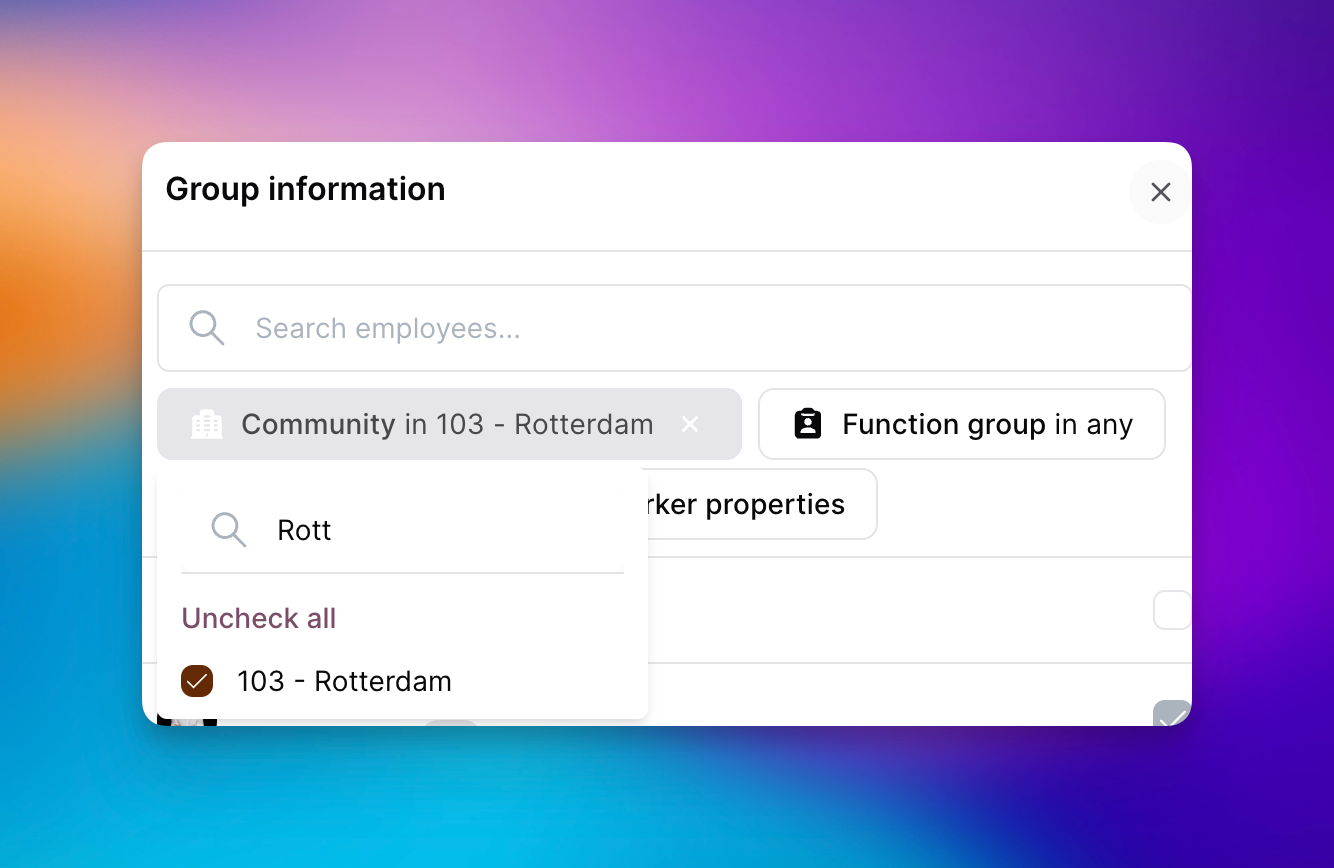
When you start a group chat or add people to one, you pick them from the colleague list, with search and filters for community, function group, manager and custom employee fields. People already in the group stay visible, and you cannot select them again.

πŸ”€ Text size follows your iPhone
On iOS, text in the app follows the text size on your iPhone, up to one step above the largest standard size. At the default size, nothing looks different.

πŸ› Bug fixes

General

  • A person's status now shows wherever their name already appears, including birthdays, events, forms, chat and high fives.

  • An event with an anonymous guest list now stops new guests once the limit is reached, and the message says the event is full.

  • Birthdays on 29 February are celebrated on 28 February when that day does not exist, and the profile still shows 29 February.

  • Invited users, registered users and the percentage of registered users now follow the date range in the statistics overview, both on screen and in the export.

  • You can paste a link into a chat group description on web, and the link opens when you tap it.

  • Replies in chat show under the message they belong to again.

  • The Hub, the calendar and your next shift load faster.

  • You receive an email again when a task is submitted.

  • A chat video with no size no longer closes the Android app, mixed photos and videos in one message show together, and several attachments sent from web line up.

  • A repeating event moves its registration deadline with each occurrence, so later dates stay open for the same amount of time.

  • You can delete your own draft of an anonymous form again.

  • A competency shows its own description for a rating level.

Web

  • You can set a community that came in through an integration as someone's main community.

  • In the page editor, the toolbar no longer sits on top of the Draft / Live menu.

  • A file finishes uploading before it is sent.

  • Inviting people who are not invited yet, or who have not logged in, from the employee overview only includes the people matching the filters on screen.

Mobile

  • On iOS you can combine bold and italic in a timeline post.

  • On Android you can zoom a PDF in Documents, including when you open it from a link in Documents.

  • On Android, adding an event to the phone calendar no longer closes the app when calendar access is off.

  • The Android app no longer closes while opening your organisation.

  • On iOS, an evaluation stays visible when its form has been removed.

  • On iOS, opening a document, folder or onboarding from the Hub shows the back button again.

Release 2026.41

Week 41 of 2026

Admins can now decide who sees each custom employee field, shortcuts and comment links are easier to share and open, and organisation groups can have a short description. You can also send voice messages in the app, give a reason when you can't make an event, and see someone's profile status wherever their name appears in the app. We've also fixed a range of issues across tasks, events, Academy and chat.

✨ General

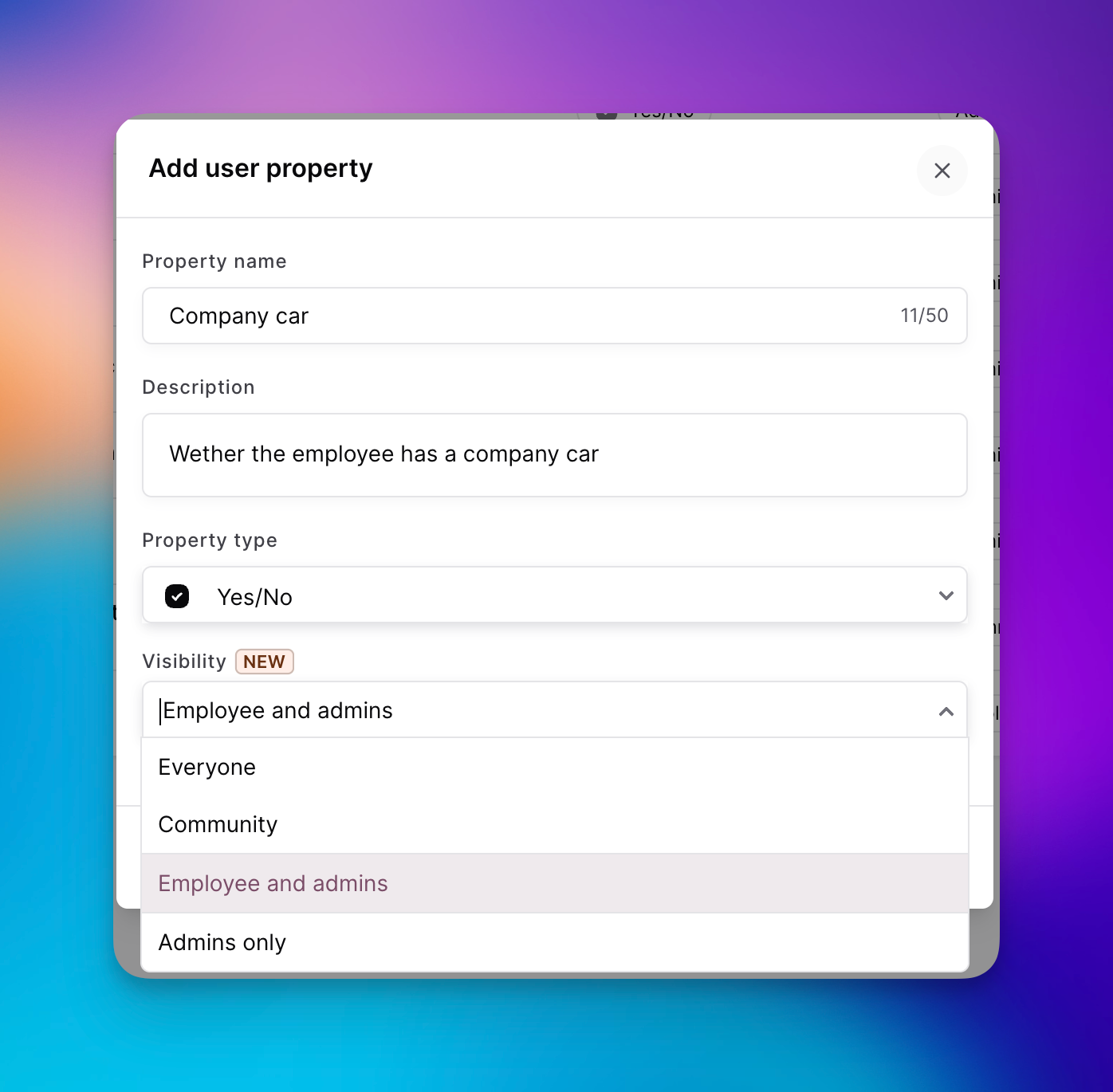
🏷️ Visibility for custom employee fields
Admins now choose who can see each custom employee field: everyone, colleagues in the same community, the employee and admins, or admins only. New and existing fields default to admins only. Profiles and colleague lists only show the fields you're allowed to see, on web and in the app, and you can filter by them. In the app, admins can also view these fields on a profile and use them when choosing an audience.


πŸ”— Shortcuts and comment links
You can now share a shortcut as a link, including from the shortcut settings on web, and it comes with a QR code just like other shared items. Opening the link takes you straight to the shortcut, including the login step if one is set up. When you add a link to a post, event, form or other Oneteam item in a comment on the timeline, a form or a task, it now shows as a tappable label with the item's name instead of a raw web address.


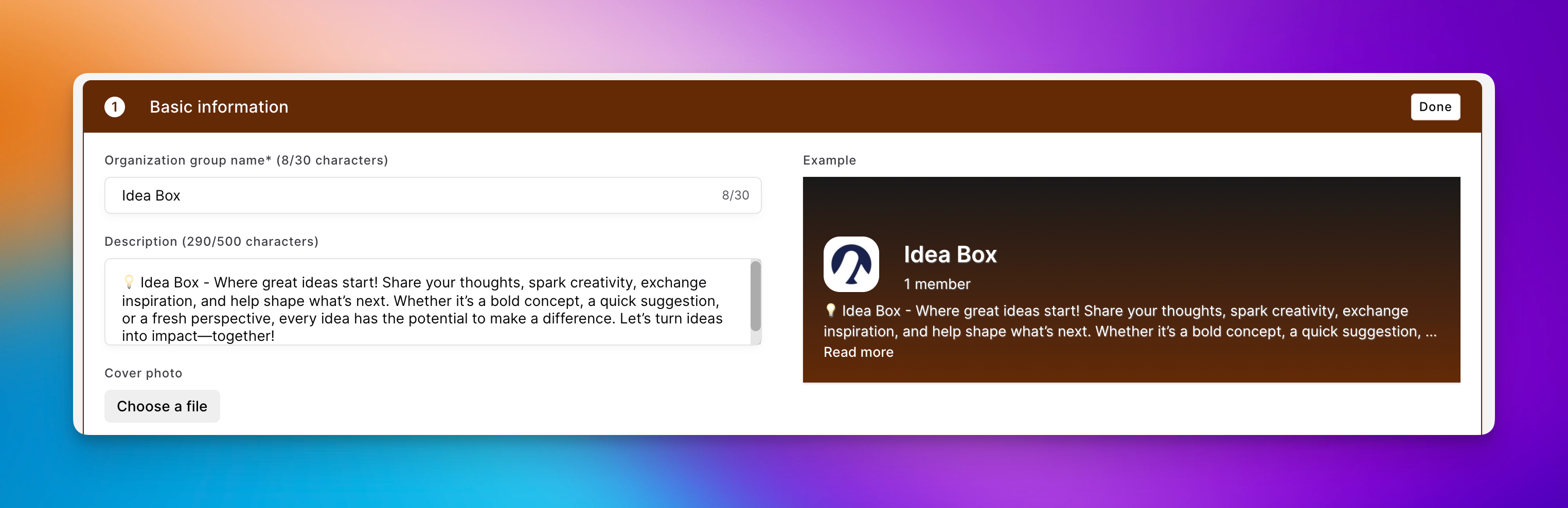
πŸ“ Organisation group descriptions
Admins can add an optional description when they create or edit an organisation group. It appears in the group overview and at the top of the group, shortened until you open the full text. Groups without a description stay as compact as before.


πŸ™‹ Reasons for declining an event
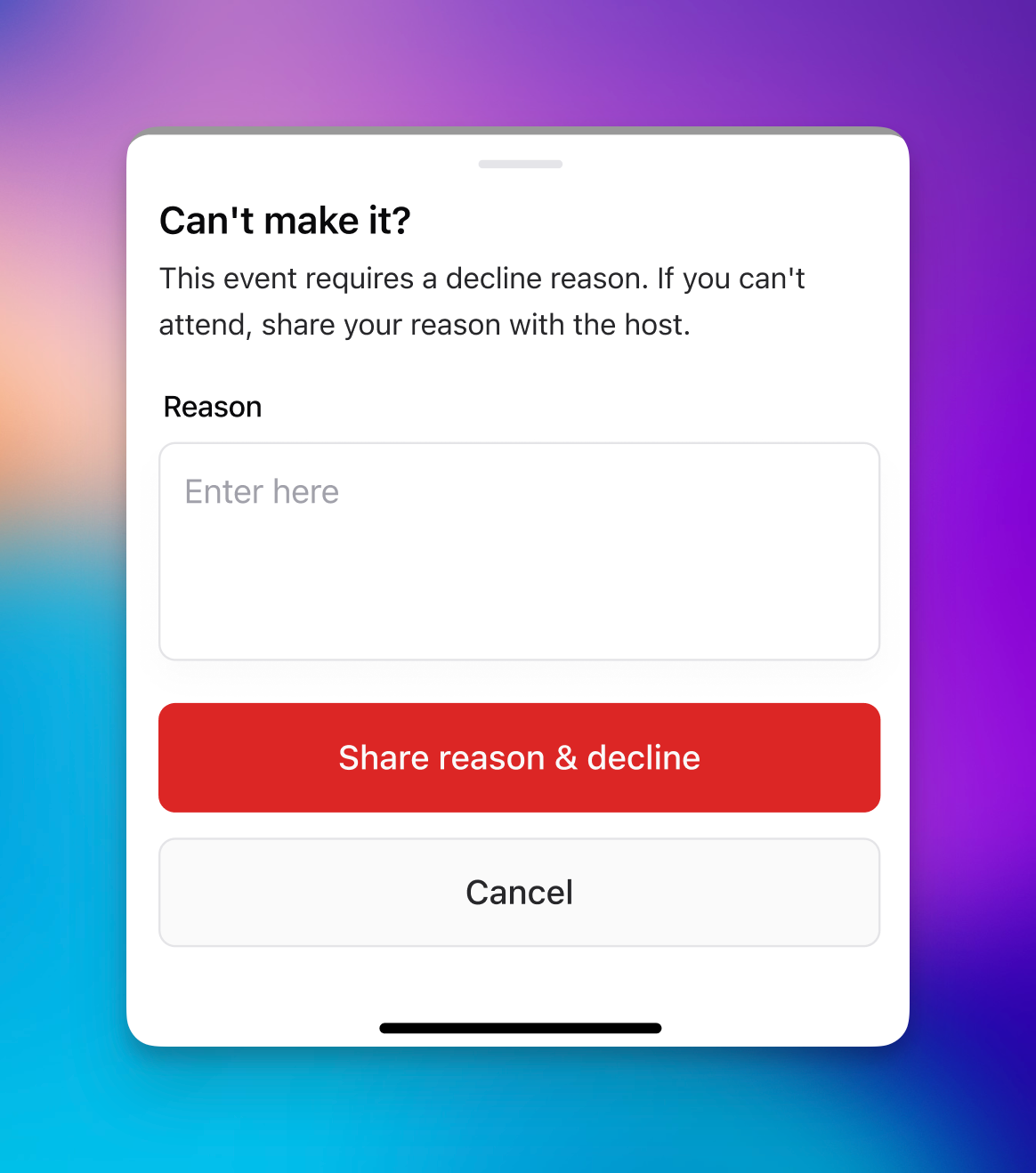
When you need to know why someone can't attend, you can now make a reason required on the event. You'll find the setting with the guest list, where it's available while the guest list is turned on. Anyone who declines is then asked for a reason, on web and in the app. You can see your own reason afterwards, and admins see all reasons in the list of people not attending.


πŸ”Œ Zapier and n8n
Oneteam now has its own integration in Zapier and n8n. You connect with an API key and build workflows in the tools your team already uses to tie systems together. A workflow can start when someone joins, finishes onboarding or completes a course, or when a birthday or contract date is coming up. From the same connection you can invite people, update their details, move them to another community, function group or team, post an organisation-wide message, send a chat message or push notification, or create a task.

πŸ’» Web

πŸ“Ž Files in comments
You can now attach a file to a comment on the timeline, on a form or on a task. Each file shows its name, type and size, and you can download it. Photos and GIFs still show inline as before, and a comment can be just a file.


πŸ‘₯ Filter members in group chats
When you create a group chat or add members, you can now filter colleagues by function, community and custom employee fields.

πŸ“± Mobile

🎀 Voice messages
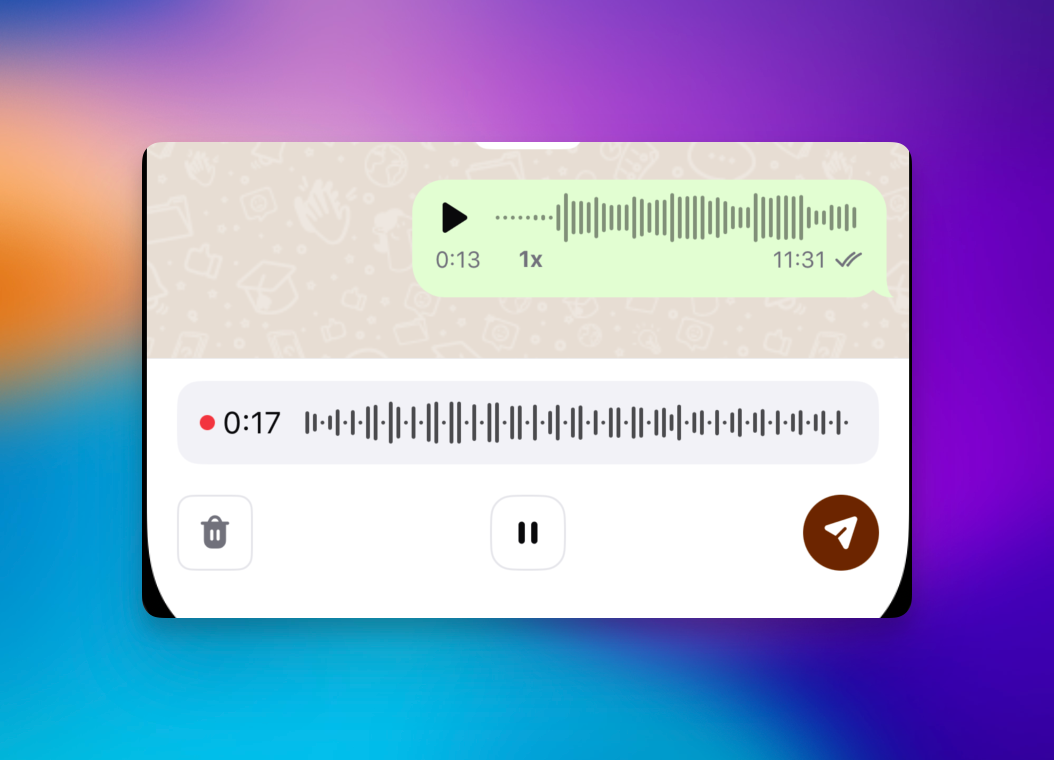
You can now record and send voice messages in chat in the app. Hold the microphone button to record. The message then plays right in the conversation, with its duration shown, instead of opening as a file.


πŸ™‚ Profile status
Profile status now shows everywhere someone's name appears in the app, just like on web. You'll see the emoji next to their name in the colleague list, on the timeline, in chat and in comments. You can also add an automatic chat reply to your status, and pause your notifications until the status ends. The reply is sent once when someone messages you, and is marked as an automatic reply. In chat, others can see that you've paused notifications.

πŸ“… Add an event to your calendar
Add to calendar on an event now lets you pick from the calendars on your phone, such as the built-in calendar, Google Calendar and Outlook. If you only have one, the event goes straight there.

πŸ› Bug fixes

General

  • The Nostradamus setting "Sync primary community only" now syncs only each person's primary community, not their other communities.

  • Academy course statistics load much faster, even when a course has thousands of participants.

  • After deleting a module from an Academy course, you can save the course again.

  • Changing the language of an Academy module no longer resets how many points it's worth.

  • Documents with an apostrophe in the file name can be downloaded again.

  • A shared team task is no longer created twice when you set it to repeat, and a daily repeating task whose deadline has passed is no longer sent out again the same day. Community managers now also have task management in their default role.

  • The employee list works again when you filter by a manager and a custom employee field at the same time.

  • The latest message in the chat list shows its photo or file again.

  • Community managers can add a colleague from their own community to a group chat, even when that person doesn't accept chat invites.

  • A task that nobody completed before the deadline now shows as expired, and a completed task stays completed.

Web

  • Send message on a profile opens a direct chat again, instead of the screen for an organisation-wide post.

  • Celebration posts, such as birthdays and work anniversaries, no longer show a button to start a chat when chat is turned off.

  • Some tables have their top border back.

  • The formatting menu in the Academy text editor stays visible while you edit.

  • A published one-time task can no longer be moved back to draft.

  • The content, schedule, audience and review status of a published one-time task can no longer be changed.

  • When you edit a repeating task, you now get a warning that the change only applies to future occurrences.

  • After saving an integration, you stay on its settings page instead of being sent back to the screen for adding an integration.

  • The time picker on an event accepts any minute, not just the full hour.

  • When you schedule a timeline post for later today, you can now change the time.

  • The notice that a form is anonymous no longer covers the form itself.

  • A document no longer reloads while you type a message to AI Buddy, and the send icon looks right in dark mode.

  • Weekday names in the recurrence settings of an event now follow your language.

  • Changing the times of a shift in Flexchange works again.

  • Question type names are no longer cut off in the list when you build a survey.

  • Open answers in an anonymous survey no longer show when they were submitted.

  • New folder in Documents once again opens the window for naming the folder.

Mobile

  • On iOS, tapping a notification for a one-time task now opens that task.

  • On iOS, a task that is 100% complete now shows in green.

  • On iOS, a task no longer shows an audience name under Assigned to when nobody specific is assigned.

  • Long options in a task dropdown are no longer cut off on iOS.

  • Tapping a notification for a repeating task now opens that task.

  • Bold headings in Academy modules display correctly on iOS.

  • What's New shows the changelog in your language instead of always in English.

  • The More screen no longer crashes on Android.

  • In dark mode on iOS, the file upload box has its border again.

  • On Android, you can now open links inside a PDF in Documents.

Earlier updates