Release 2026.39
Week 39 of 2026
The headline this week is Tasks: assign one-time or repeating work, follow progress, and let people mark it as done. Reports replaces the old analytics with charts you shape yourself, so you get far more insight into how Oneteam is used. We also shipped Event types so you can label and filter events, and Recurring events so a repeating series no longer has to be copied by hand. A number of bugs are fixed along the way.
✨ General
✅ Tasks
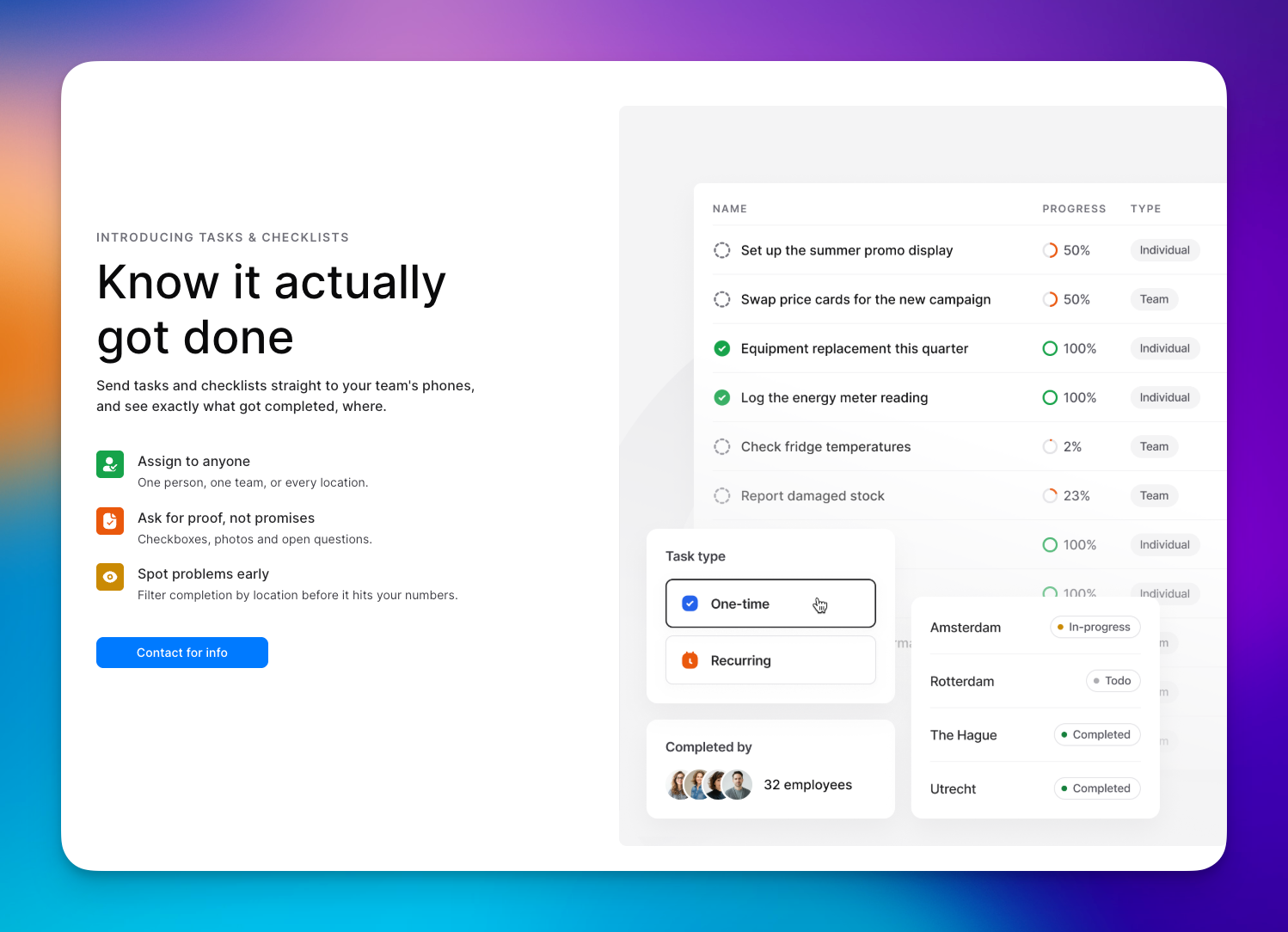
Assign work as a one-time checklist for one person, a weekly team handover, or a repeating task per store, with questions or as a simple mark as done. People see what is open, fill in a team task together, follow progress and status, and get a notification when a new task is waiting. Tasks is in beta. Contact Customer Success for more information.
🏷️ Event types
You can now tag events with types such as training, social or briefing, and an event can have more than one. Types are reused across the organisation as you create them, they show as chips wherever the event appears, and you can filter the events list by type.
🔁 Recurring events
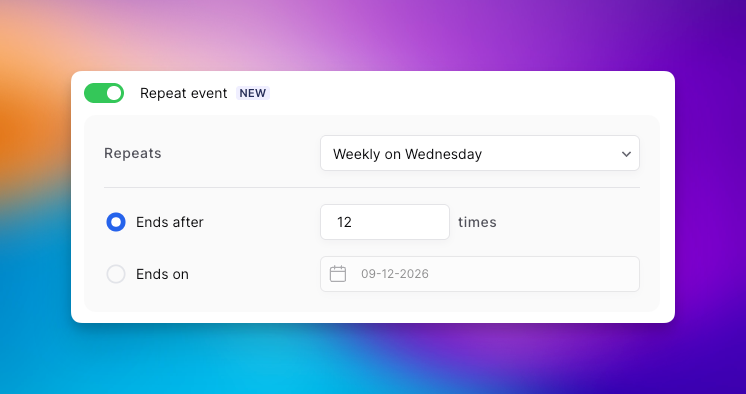
When you create an event you can now set it to repeat, daily, weekly, monthly or yearly, instead of duplicating the date by hand. Editing or deleting asks whether you mean only this occurrence, this and the following ones, or the whole series.
🔔 Notifications
Push notifications and the in-app notification centre now stay in step for the same events, from mentions and comments to an event that is about to start. They also show the person they are actually about, such as the colleague whose work anniversary it is, and fall back to a type icon instead of your own profile picture.
📅 Tactiplan
Organisations on Tactiplan can now bring people and schedules into Oneteam, so that information no longer has to be maintained twice.
🤖 More consistent AI answers
The AI assistant now answers more consistently when the same question is asked more than once.
⬇️ Scroll to continue in Academy
On a course screen, Continue stays disabled until you have scrolled through the content, so people cannot skip past the material. If the page already fits on screen, you can continue immediately.
💻 Web
📈 Reports
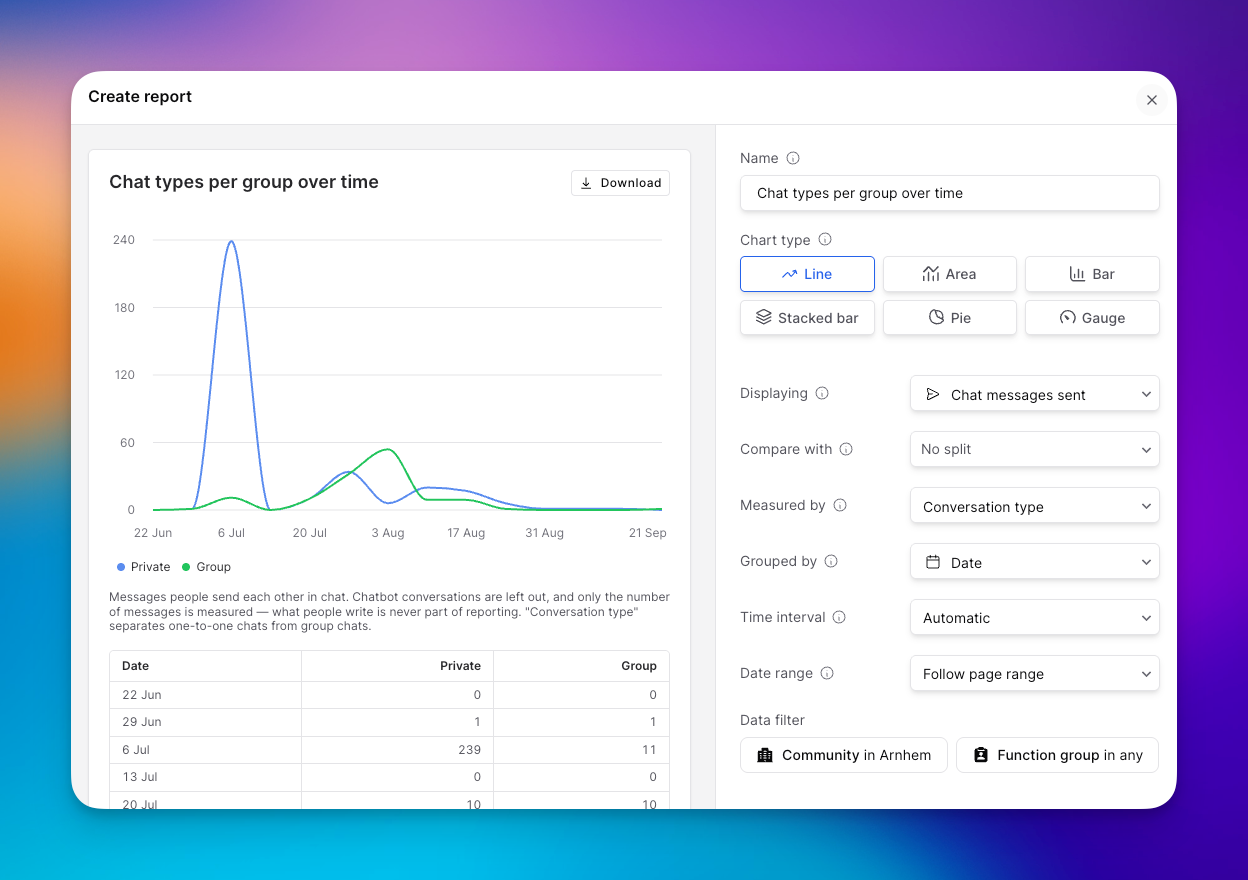
Reports replaces the old analytics. You are no longer limited to a handful of fixed dashboards: you choose the metrics, the chart, the split by community or team, and the date range, and you can compare periods. That covers activity, communication, documents, events, forms, Academy, people, performance and surveys, so you can see far more of what is actually happening in Oneteam. Save reports, favourite them from a preset library, and download as CSV or Excel.
🧩 New quiz types in generated courses
When you generate a course with AI, it can now include drag-in-order and match-terms quizzes, not only the older question types.
📊 Pulse surveys on web
Unanswered pulse questions now appear at the top of the timeline on web, with the same anonymous slider you already know from the home screen in the app. Submit or skip, and the next question comes up if there is one.
📖 Course editor opens the first screen
Opening a course in the editor now unfolds the first module and shows the first screen straight away, so you are not left staring at an empty details pane.
📱 Mobile
🌐 Web pages as AI sources
The AI assistant can now use a public web page as a knowledge source, not only uploaded documents. Those sources show up in the list in the app, and you can open the page from there.
📣 What's new
The app now has a What's new screen for this version, so you can read what shipped without leaving Oneteam. You will find it in More, and it badges after an update when there are notes you have not opened yet.
🐛 Bug fixes
General
Learning paths now appear for employees in the same order you set in the dashboard.
Event guest list exports no longer include people who have been deleted, and they match the guest list on screen.
Opening onboarding insight on a personal profile no longer fails to load.
People synced from Loket now show the surname they use at work, not their birth name.
Web
Send message on a user profile now opens a chat with that person, not a new organisation-wide post.
The celebration chat button is hidden when Chat is turned off for the organisation.
Search is back on the Forms moderate tab.
The AI assistant stays hidden for organisation admins who are not in its audience.
Text written with the AI assistant can be edited afterwards.
The manager field is editable again after automatic manager assignment is turned off.
Role permissions no longer appear twice when you add or edit a community manager.
The AI assistant button no longer covers the row menu on the last item in a document list.
Mentions of people and links on a timeline post now line up with the rest of the text.
Quiz translations now work properly again.
Creating a course from the Academy empty state now opens the choice between AI, a template and from scratch, instead of always starting from scratch.
The colleague overview and forms admin dashboard no longer cut off on smaller screens.
The documents toolbar sits at the top of the page again, instead of halfway down.
Mobile
The timeline on iOS no longer fails to load when a post includes a link the app does not recognise yet.
On Android, new timeline posts show a reload prompt again instead of leaving the feed unchanged.
Notification badges on the Timeline and Notifications tabs are visible again on Android.
Android no longer shows "Community not available" after you fully close the app and open it again.
PDFs in documents now scroll again when dark mode is on, on iOS.
The not-seen list on a timeline post can be opened again on iOS.
PDFs keep their original colours in dark mode on iOS and Android.